Most people browse the internet with far less privacy than they think. Your internet provider can often see the websites you visit, advertisers track browsing behavior across devices, and unsecured public Wi-Fi networks still expose users to avoidable risks.
That’s the problem a VPN is designed to solve.
So, how does a VPN work?
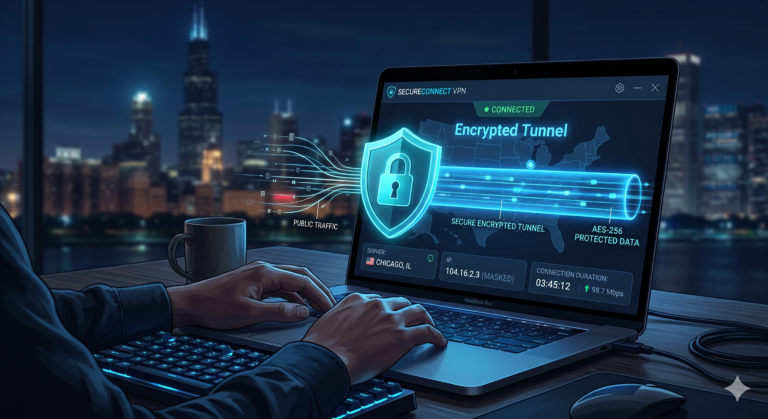
A VPN creates an encrypted connection between your device and a remote server operated by the VPN provider. Instead of sending readable traffic directly through your internet provider, your data travels through a secure tunnel first.
If you’re new to the topic, start with this beginner’s guide to VPNs before getting into protocols, encryption standards, and server routing.
According to the Federal Trade Commission, poorly secured public networks remain one of the easiest environments for attackers to exploit because unencrypted traffic can still be intercepted on shared connections.
What Happens When You Connect to a VPN?
The process starts the second you press “Connect” inside a VPN app.
Your device first establishes a secure connection with a VPN server. That server could sit in another city, another state, or another country depending on the location you choose.
Once connected, the VPN encrypts your outgoing traffic before it leaves your device. That encrypted traffic travels through a protected tunnel to the VPN server, where it gets decrypted and forwarded to the destination website or app.
Here’s what the process actually looks like:
- You open a website or streaming app.
- Your VPN encrypts the outgoing traffic.
- The encrypted data moves through the VPN tunnel.
- The VPN server forwards the request to the website.
- The website responds to the VPN server instead of directly to your device.
- The VPN encrypts the returning traffic and sends it back to you.
All of this usually happens in less than a second.
Without a VPN, your traffic flows directly from your device to your internet provider and then to the websites you visit. With a VPN enabled, your provider mainly sees encrypted traffic traveling to a VPN server rather than your actual browsing activity.
How Does a VPN Hide Your IP Address?
Your IP address acts like a public identifier for your internet connection. Websites use it to estimate your location, apply regional restrictions, and sometimes track browsing activity across sessions.
A VPN hides that IP address by replacing it with the address of the VPN server you connect to.
For example, if you live in Texas but connect to a server in New York, most websites will identify you as browsing from New York instead of Texas.
This is why VPNs are commonly used for:
- Reducing location tracking
- Accessing geo-restricted content
- Improving privacy
- Protecting browsing sessions on public Wi-Fi
The quality of the VPN server matters more than many beginners realize. Slow or overloaded servers can increase latency and reduce speeds significantly. Understanding how VPN servers work also helps explain why premium VPN companies invest heavily in global server infrastructure.
What Is an Encrypted VPN Tunnel?
Encryption is the foundation of every modern VPN.
When your VPN encrypts traffic, it converts readable information into scrambled code before transmission. Anyone intercepting that traffic sees unreadable data instead of passwords, browsing history, or downloaded files.
Most reputable VPN providers now use AES-256 encryption or ChaCha20 encryption. Both remain highly secure for consumer VPN usage in 2026.
Think of encryption like sending your data inside a locked armored truck instead of mailing it in transparent packaging.
Without encryption:
- Networks can inspect your traffic
- Attackers may intercept sensitive information
- Internet providers can monitor browsing behavior
With encryption:
- Traffic becomes unreadable during transit
- Public Wi-Fi risks decrease substantially
- Passive monitoring becomes far more difficult
If you want the technical breakdown behind keys, ciphers, and tunneling protocols, learning how VPN encryption protects data explains why modern VPNs can secure traffic even on untrusted networks.
Which VPN Protocols Matter Most in 2026?
The VPN protocol determines how the encrypted tunnel operates. It affects speed, stability, battery usage, and overall security.
WireGuard
WireGuard has become the preferred protocol for many leading VPN providers because it delivers excellent speeds with lower overhead than older VPN technologies.
Independent testing across multiple review labs regularly shows WireGuard reducing speeds by only 10% to 20% on nearby servers.
Its biggest advantages include:
- Faster connection times
- Lower latency
- Better mobile efficiency
- Smaller codebase for auditing
OpenVPN
OpenVPN remains one of the most trusted protocols in the VPN industry because security researchers have audited it publicly for years.
It’s usually slower than WireGuard but still highly secure and widely compatible across routers, desktops, and mobile devices.
IKEv2/IPsec
IKEv2 remains popular on smartphones because it reconnects quickly when switching between Wi-Fi and cellular networks.
However, most modern consumer VPN apps now prioritize WireGuard because it balances speed and security more effectively.
Can Your ISP Still See What You Do With a VPN?
Your internet provider can still see that you’re connected to a VPN. What it usually cannot see is the actual browsing activity moving inside the encrypted tunnel.
That distinction matters.
With a VPN active, your ISP may still see:
- VPN usage
- Connection timestamps
- Total bandwidth usage
- The VPN server IP address
But it generally cannot see:
- Specific websites visited
- Search queries
- Download contents
- Streaming activity inside the tunnel
That extra layer of privacy is one reason many travelers and remote workers research the everyday reasons to use a VPN daily before connecting to hotel, airport, or coffee shop Wi-Fi.
Still, VPNs are not complete anonymity tools. Cookies, browser fingerprinting, logged-in accounts, and tracking scripts can still identify users across the web. Many beginner VPN guides skip that limitation entirely even though it’s critical for understanding what a VPN can and cannot protect against.
Why Does a VPN Slow Down Your Internet Speed?
Every VPN reduces speed to some degree. The question is how much.
When you use a VPN, your traffic travels farther and passes through encryption processes before reaching its destination. That adds overhead, which can increase latency and reduce download speeds.
In real-world testing, premium VPNs using WireGuard often reduce speeds by roughly 10% to 25% on nearby servers. Long-distance connections usually perform worse because your traffic may travel thousands of extra miles before reaching the destination website.
For example:
- Connecting from California to a New York VPN server usually causes minimal slowdown
- Connecting from California to Singapore often increases latency significantly
- Overloaded servers can reduce performance even further during peak hours
Several factors affect VPN speed:
Server Distance
The farther the VPN server is from your physical location, the longer your data takes to travel.
That delay becomes especially noticeable during:
- Gaming
- Video calls
- Live streaming
- Cloud gaming
- Large file transfers
Encryption Overhead
Stronger encryption requires additional processing power. Modern protocols like WireGuard reduce that overhead substantially, but older protocols can still create noticeable slowdowns on weaker devices.
Server Congestion
If too many users connect to the same server simultaneously, speeds can drop sharply. This is one reason premium VPN providers maintain large server networks instead of relying on only a few crowded locations.
If you’re comparing services, our list of top-rated VPN services breaks down which providers consistently maintain the fastest speeds during testing.
Limitations & Performance Notes:
VPNs improve privacy, but they also come with tradeoffs that many beginner guides ignore.
VPNs Cannot Prevent All Tracking
A VPN hides your IP address, but it does not stop:
- Browser fingerprinting
- Tracking cookies
- Logged-in account tracking
- Social media profiling
- Malware infections
If you stay logged into Google, Facebook, or Amazon while browsing, those companies can still associate activity with your account regardless of whether a VPN is active.
Free VPNs Often Have Major Restrictions
Many free VPN services limit:
- Monthly bandwidth
- Server locations
- Streaming access
- Speeds
- Simultaneous connections
Some free VPNs also log user activity or inject advertising traffic into browsing sessions.
That’s why privacy researchers usually recommend carefully vetted providers instead of random free apps. If budget matters, these reliable free VPN services are safer starting points than downloading unknown apps from mobile app stores.
VPNs Can Trigger CAPTCHA Checks
Websites sometimes flag VPN traffic because large numbers of users share the same server IP addresses.
That can lead to:
- CAPTCHA requests
- Temporary login blocks
- Extra account verification prompts
Streaming platforms and banking websites are especially aggressive about this behavior.
Some Networks Block VPN Traffic
Certain schools, workplaces, and countries actively restrict VPN usage using deep packet inspection or firewall rules.
Modern VPN protocols can sometimes bypass those restrictions, but success varies widely depending on the network.
What Can’t a VPN Protect You From?
One of the biggest misconceptions about VPNs is that they make you anonymous online.
They don’t.
A VPN improves privacy, but it cannot protect you from every tracking or security threat.
Here’s what a VPN does well:
- Encrypts internet traffic
- Hides your IP address
- Reduces ISP visibility
- Secures public Wi-Fi traffic
Here’s what it does not do:
- Remove malware from your device
- Stop phishing attacks
- Prevent account-based tracking
- Hide activity from websites you log into
- Automatically block malicious downloads
That’s why cybersecurity experts usually treat VPNs as one layer inside a broader privacy strategy rather than a complete solution.
Are VPNs Safe to Use?
VPN safety depends heavily on the provider you choose.
A trustworthy VPN should clearly explain:
- What data it logs
- Where the company operates
- Which encryption standards it uses
- Whether independent audits verify its claims
The biggest privacy risk with VPNs is simple: you shift trust from your internet provider to the VPN company itself.
That’s why no-log policies matter so much.
A true no-log VPN minimizes stored user activity so there’s little or no browsing data available if authorities, advertisers, or attackers request access.
However, not every provider follows those claims honestly. Several VPN services have faced criticism over hidden ownership structures, vague privacy policies, or misleading logging statements.
If you’re evaluating providers, understanding whether VPNs are actually safe requires looking beyond marketing pages and checking independent audits, breach history, and company transparency.
Are VPNs Legal in the United States?
Yes. VPN usage is legal throughout the United States.
Businesses, journalists, travelers, and remote workers use VPNs every day for privacy and security reasons.
However, using a VPN does not make illegal activity legal.
For example:
- Piracy laws still apply
- Fraud laws still apply
- Hacking laws still apply
A VPN simply encrypts your traffic and masks your IP address. It does not grant immunity from law enforcement or platform policies.
Some countries heavily restrict or ban VPN usage entirely, particularly governments that tightly control internet access.
If you travel internationally, reviewing current VPN legality in the US and abroad can help avoid problems before connecting from another country.
How Do You Install and Start Using a VPN?
Modern VPN apps are much simpler than they were a decade ago.
Most providers now offer one-click apps for:
- Windows
- macOS
- Android
- iPhone
- Smart TVs
- Routers
- Browsers
The setup process usually takes less than five minutes:
- Choose a VPN provider
- Download the app
- Sign into your account
- Select a server location
- Press “Connect”
If you’ve never configured one before, this step-by-step guide on how to install a VPN walks through the process on major devices.
How Do You Choose the Right VPN Service?
Most VPN providers advertise the same promises: fast speeds, strong privacy, and secure browsing. In practice, the differences between services can be significant.
A VPN that works well for streaming may perform poorly for gaming. A provider with excellent mobile apps may offer weak router support. Some VPNs prioritize privacy transparency, while others focus heavily on bypassing geo-restrictions.
The best choice depends on how you actually use the internet.
What Features Matter Most in a VPN?
For most users, these are the features worth prioritizing first.
Fast Modern Protocols
WireGuard has become the standard for high-performance VPN connections because it delivers strong security with lower speed loss than older protocols.
If a VPN still relies heavily on outdated protocols without properly supporting WireGuard, performance usually suffers.
Clear No-Log Policies
A VPN provider should explain exactly what data it collects and how long it stores that information.
Look for:
- Independent security audits
- Transparent ownership
- Public privacy policies
- Real-world logging history
Several major providers now publish third-party audits verifying that their infrastructure matches their no-log claims.
Large Server Networks
A larger server network reduces congestion and improves reliability.
This matters most for:
- Streaming
- Gaming
- Torrenting
- International travel
- Remote work
Premium VPN providers often maintain thousands of servers globally to distribute traffic more efficiently.
Kill Switch Protection
A kill switch automatically blocks internet access if the VPN disconnects unexpectedly.
Without a kill switch, your device may briefly expose its real IP address during connection drops.
DNS Leak Protection
Even with a VPN active, poorly configured devices can sometimes send DNS requests outside the encrypted tunnel.
That creates DNS leaks, which may expose browsing activity to internet providers or local networks.
Reliable VPN apps automatically route DNS traffic securely through the VPN connection.
Should You Pay for a VPN?
Usually, yes.
Running a secure global VPN network costs money. Providers must maintain infrastructure, bandwidth, apps, security audits, and support teams.
If a VPN service is completely free, the company still needs revenue somewhere.
That revenue may come from:
- Advertising
- Data collection
- Selling analytics
- Bandwidth restrictions
- Aggressive upselling
That doesn’t mean every free VPN is dangerous. Some reputable companies offer limited free plans as entry-level products.
Still, paid VPNs almost always provide:
- Better speeds
- More server locations
- Higher streaming reliability
- Stronger privacy guarantees
- More simultaneous device connections
For users trying to balance performance and price, comparing affordable VPN providers side by side often reveals large differences in speed consistency, logging policies, and long-term subscription costs.
Which Devices Can Use a VPN?
Modern VPNs support far more than laptops and smartphones.
Most major providers now offer apps for:
- Windows
- macOS
- Android
- iPhone
- Linux
- Smart TVs
- Fire TV devices
- Gaming consoles
- Routers
Installing a VPN on your router protects every connected device automatically, including devices that don’t support VPN apps natively.
That approach works especially well for:
- Smart home devices
- Apple TV
- PlayStation
- Xbox
- Guest Wi-Fi networks
However, router-based VPNs can reduce speeds more noticeably because the router itself handles encryption for the entire network.
Can a VPN Improve Streaming and Gaming?
Sometimes — but not always.
VPNs are commonly used to access region-locked streaming libraries by changing your visible location. However, streaming platforms aggressively block VPN traffic, so results vary by provider.
Premium VPNs usually perform better because they rotate IP addresses more frequently and maintain larger server pools.
For gaming, the situation is more complicated.
A VPN usually increases latency because your traffic travels farther before reaching the game server. However, some players still use VPNs to:
- Avoid ISP throttling
- Reduce DDoS exposure
- Access regional servers
- Bypass restrictive local networks
In some cases, routing traffic through a better network path can slightly improve stability. But most of the time, gaming performance improves more from choosing a nearby VPN server than from using a VPN itself.
What Happens Behind the Scenes When a VPN Connects?
Most beginner guides simplify VPNs into “privacy apps,” but the underlying process is much more technical.
When you connect to a VPN:
- Your app authenticates with the VPN server
- Encryption keys are exchanged securely
- A virtual tunnel interface is created
- DNS requests reroute through the VPN
- Your device updates routing tables
- Encrypted packets begin moving through the tunnel
All of this typically happens automatically within seconds.
Modern VPN apps also include additional protections such as:
- Automatic kill switches
- Split tunneling
- Tracker blocking
- Multi-hop routing
- Obfuscated servers
These features matter most in restrictive networks or high-surveillance environments.
Final Verdict: Is a VPN Worth Using?
For most people, yes.
A VPN will not make you invisible online, stop every form of tracking, or replace good cybersecurity habits. But it does close several major privacy gaps that still exist across the modern internet.
A good VPN:
- Encrypts your traffic
- Hides your IP address
- Secures public Wi-Fi connections
- Reduces ISP visibility
- Improves privacy during everyday browsing
Understanding how does a VPN work also makes it easier to recognize exaggerated marketing claims. The best VPN services focus on transparency, strong encryption, audited no-log policies, and consistent real-world performance — not flashy promises of “total anonymity.”
If you’re choosing a provider today, start with tested services that publish independent audits, support WireGuard, and maintain fast server networks across multiple regions.