
If you’ve recently discovered Stremio, you may be wondering what happens after you click Play. Unlike streaming platforms such as Netflix or Disney+, Stremio doesn’t maintain its own catalog of movies or TV shows. Instead, it acts as a central hub that organizes content from multiple sources through an add-on system.
Understanding this distinction is the key to understanding how Stremio works.
Many new users assume the application stores movies or streams them directly. In reality, Stremio focuses on three core tasks: organizing media information, locating available streaming sources through installed add-ons, and playing content from those sources. Because of this architecture, the app remains lightweight while supporting a wide range of content providers and devices.
In this guide, you’ll learn how Stremio works behind the scenes, how add-ons provide streaming sources, what role metadata plays, and what happens technically from the moment you search for a title until playback begins.
What Is Stremio?
Stremio is a cross-platform media center available for Windows, macOS, Linux, Android, Android TV, and several other platforms. Rather than functioning as a streaming service, it serves as a unified interface that helps you discover, organize, and watch content from multiple providers.
Think of it as a smart media browser rather than a content library.
When you search for a movie or TV series, Stremio displays information such as:
- Posters
- Episode lists
- Cast and crew
- Ratings
- Synopses
- Available streaming sources
The application itself doesn’t upload, host, or maintain a library of movies. Instead, it retrieves this information from external metadata providers and combines it into a single, consistent interface.
This separation between the interface and the content sources is one of Stremio’s defining characteristics.
How Does Stremio Work at a High Level?
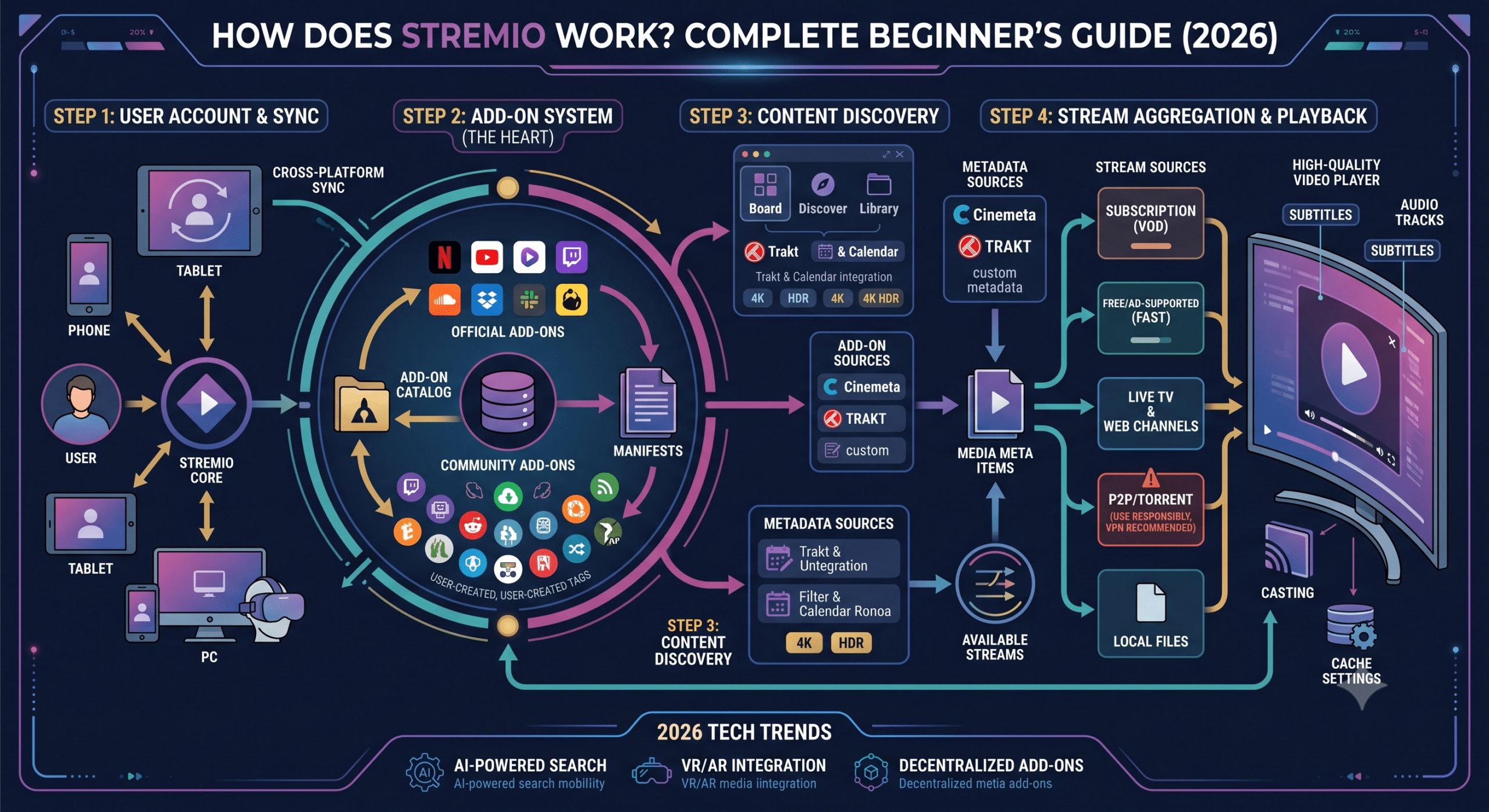
Every time you interact with Stremio, several components work together behind the scenes. Although the process appears nearly instantaneous, it’s made up of multiple steps.
A simplified workflow looks like this:
You
      ↓
Stremio Application
      ↓
Installed Add-ons
      ↓
Metadata & Stream Sources
      ↓
Available Streams
      ↓
Video Playback
Each component has a different responsibility.
The Stremio application manages your library, search history, settings, subtitles, and playback interface. It also communicates with your installed add-ons whenever you request content.
The add-ons act as connectors. They receive information about the title you’ve selected and return a list of available streaming sources that match your request.
Once you choose one of those sources, Stremio opens the stream using its built-in player.
The Difference Between Metadata and Media
One of the most common misconceptions is that Stremio stores movies.
It doesn’t.
Instead, Stremio primarily works with metadata.
Metadata is information about content rather than the content itself. For a movie, metadata may include:
- Title
- Release year
- Genre
- Runtime
- Poster artwork
- Description
- Cast
- Ratings
- Episode information
This information helps Stremio create an organized catalog without hosting video files.
The actual video comes from an external source identified by an installed add-on.
This distinction explains why two users can install different add-ons and see different streaming options for the same movie while viewing identical metadata inside the application.
What Happens When You Press Play?
Although it feels like a single action, pressing Play triggers several requests in sequence.
First, Stremio identifies the movie or episode you’ve selected using its metadata database.
Next, it sends a request to each compatible installed add-on. The request contains information such as the content identifier, title, and season or episode number when applicable.
Each add-on searches the services or indexes it supports and returns any matching streaming sources.
Stremio then combines those results into a single list, allowing you to compare factors such as:
- Resolution
- File size
- Source type
- Language
- Available subtitles
After you choose a source, the application connects to it and begins buffering enough data to start playback. Additional data is fetched as you continue watching, helping minimize interruptions on stable connections.
Because Stremio separates source discovery from playback, adding or removing add-ons can change the available streams without changing the application’s interface or your personal library.
How Do Stremio Add-ons Find Streaming Sources?
The add-on system is what makes Stremio different from traditional streaming apps. Instead of maintaining its own catalog of playable content, Stremio relies on add-ons to discover where a movie or TV episode is available.
An add-on is essentially a small web service that follows Stremio’s add-on protocol. When you select a title, the application sends a request containing information such as the content ID, movie title, release year, or episode number. The add-on processes that request and returns a list of compatible streams.
This design keeps the core application lightweight. Rather than updating the app every time a new streaming source appears, developers can update individual add-ons independently.
Official vs. Community Add-ons
Stremio supports two broad categories of add-ons.
Official add-ons are distributed through the application’s official catalog and generally connect to legitimate content providers or public metadata services. They typically offer a predictable experience and are maintained according to Stremio’s add-on standards.
Community add-ons are created by independent developers. Some connect to public-domain libraries or legally available streams, while others index sources from elsewhere on the internet. Because they’re developed outside the official project, quality, reliability, and legality vary depending on the specific add-on.
Before installing any community add-on, review its reputation, understand what services it connects to, and install only those you trust.
How Stremio Builds a Stream List
Suppose you search for a movie.
Rather than querying a single database, Stremio asks every relevant installed add-on whether it has matching streams.
Each add-on may return information such as:
- Video resolution (720p, 1080p, or 4K)
- Codec
- HDR support
- Audio format
- Language
- Subtitle availability
- Source type
- File size
Stremio merges these responses into one interface, making it easier to compare available options without visiting multiple websites or applications.
If several add-ons return the same movie, you’ll often see multiple versions that differ in quality or source.
Where Do the Streams Come From?
The answer depends entirely on the add-on.
Different add-ons may provide streams from:
- Direct HTTPS video servers
- Public media archives
- IPTV-compatible sources
- Personal media servers
- Peer-to-peer (P2P) networks
- Debrid-supported services
Stremio itself doesn’t determine where the video originates. It simply displays the streams returned by the installed add-ons and plays the one you choose.
This separation is one of the reasons the application can support many different content ecosystems without becoming tied to a single provider.
Does Stremio Use BitTorrent?
Sometimes.
Many users associate Stremio with torrent streaming, but that’s only one possible source type.
Whether BitTorrent is used depends on the add-ons you’ve installed and the stream you select.
If an add-on returns a direct HTTPS stream, playback works much like any other streaming service.
If an add-on returns a torrent-based source, the process changes slightly.
Instead of downloading the entire file before playback begins, Stremio connects to the BitTorrent swarm, requests pieces of the file from available peers, buffers enough data to start playing, and continues downloading additional pieces while you watch.
This approach is known as sequential streaming.
Unlike a traditional torrent client, the focus is immediate playback rather than downloading the complete file first.
Why Do Seeders Matter?
Torrent-based playback depends on other users sharing the file.
These users are known as seeders.
Generally:
- More seeders lead to faster startup times.
- Higher availability reduces buffering.
- Rare content with few seeders may load slowly or fail to play.
Even with a fast internet connection, a stream can struggle if there aren’t enough peers actively sharing the content.
That’s why two movies with identical resolutions may perform very differently.
How Debrid Services Change the Experience
Some users connect a debrid service to compatible add-ons.
A debrid service acts as an intermediary between torrent sources and your device. Instead of downloading pieces directly from other peers, the requested content may already be cached on the debrid provider’s infrastructure.
If a cached copy exists, playback often begins more quickly because the video is delivered over a conventional HTTPS connection rather than through a live peer-to-peer swarm.
This can improve:
- Startup time
- Buffering performance
- Availability of older content
- Consistency on slower networks
However, whether this happens depends on the specific debrid service, the requested content, and the add-on you’re using.
Why Some Movies Have More Sources Than Others
You’ve probably noticed that newly released, popular titles often display dozens of available streams, while older or less popular content may show only a handful.
Several factors influence the number of available sources:
- Popularity
- Age of the content
- Supported streaming services
- Active community maintenance
- Availability of peers
- Geographic licensing restrictions
- Add-ons currently installed
Installing additional reputable add-ons can increase the variety of available sources, but more isn’t always better. A smaller collection of well-maintained add-ons often provides a more reliable experience than installing every available option.
In the next part, we’ll examine the privacy and security side of Stremio, including when your IP address may be visible, how different streaming methods affect your privacy, common safety considerations, and whether using a VPN makes sense depending on how you use the application.
Is Stremio Safe and Private to Use?
Whether Stremio is “safe” depends on two separate factors: the application itself and the sources you use through it. Understanding the difference is important because many discussions about Stremio blur these concepts together.
The official Stremio application is a legitimate media center that doesn’t host copyrighted content or operate its own streaming service. Its primary functions are organizing your media library, retrieving metadata, and displaying streaming sources returned by installed add-ons.
The safety of your overall experience, however, depends largely on the add-ons you install and the types of streams you choose.
Is the Stremio Application Safe?
The official application is open source, allowing developers and security researchers to inspect much of its code. It receives regular updates, supports multiple operating systems, and uses encrypted HTTPS connections for many of its online services, such as account synchronization and metadata retrieval.
Like any software, it’s best to:
- Download Stremio only from the official website.
- Keep the application updated.
- Avoid modified or unofficial versions.
- Install only add-ons you trust.
Following these basic practices significantly reduces your security risk.
Are Add-ons Safe?
Add-ons deserve more scrutiny than the application itself.
Every add-on acts as a service that responds to requests from your Stremio client. While many are well maintained, others may be outdated, abandoned, or created by unknown developers.
Before installing a community add-on, consider:
- Who developed it?
- Is it actively maintained?
- Does the community generally trust it?
- Does it request unusual permissions?
- Is its source code publicly available?
A reputable add-on with an active development community is generally a better choice than one with little documentation or support.
When Is Your IP Address Visible?
This is one of the most frequently misunderstood aspects of Stremio.
The answer depends on the type of stream you’re using.
HTTP Streaming
If your selected source is a direct HTTPS stream, your device communicates with the streaming server in much the same way it would when watching videos on other online platforms.
In this scenario, your internet service provider (ISP) can typically see that you’re communicating with a particular server, although the encrypted connection prevents them from viewing the contents of the video itself.
Torrent-Based Streaming
Torrent streams work differently.
When using peer-to-peer (P2P) sources, your device exchanges data directly with other participants in the swarm. That means your public IP address is generally visible to those peers because it’s required for the BitTorrent protocol to function.
This visibility doesn’t automatically create a security problem, but it’s an important privacy consideration. Many users are unaware that torrent-based streaming shares this characteristic with traditional torrent clients.
What Does a VPN Change?
A Virtual Private Network (VPN) creates an encrypted tunnel between your device and a VPN server.
If you use Stremio with torrent-based sources while connected to a VPN:
- Other peers see the VPN server’s IP address instead of yours.
- Your ISP can’t directly see the destinations of your encrypted traffic.
- Your public IP address is masked from the torrent swarm.
A VPN does not make unsafe add-ons trustworthy or legalize access to copyrighted material. Its role is to improve network privacy by encrypting your connection and replacing your public IP address with that of the VPN server.
For users who frequently use peer-to-peer streaming, this additional layer of privacy is one reason VPNs are commonly recommended.
Do Debrid Services Improve Privacy?
Debrid services can also change how traffic flows.
If the requested file is already cached on the debrid provider’s infrastructure, your device typically retrieves it over an encrypted HTTPS connection instead of connecting directly to a peer-to-peer swarm.
In practical terms, this means:
- You aren’t downloading pieces directly from multiple peers.
- Startup times may improve.
- Buffering can be reduced.
- Your connection behaves more like a traditional HTTPS download.
While this changes the delivery method, it doesn’t replace good security practices. You should still use trusted software, reputable add-ons, and secure account credentials.
Why Do Some Streams Buffer?
Buffering isn’t always caused by a slow internet connection.
Several technical factors affect playback performance:
Limited Seeders
Torrent-based streams rely on other users sharing the file. If only a few seeders are available, download speeds may fluctuate, causing interruptions during playback.
Server Congestion
Direct streaming servers can become overloaded, especially when popular content is released. Even a fast home connection can’t compensate for an overloaded source server.
Network Conditions
Wi-Fi interference, high household network usage, or ISP congestion can all reduce available bandwidth and increase latency.
Device Performance
Older streaming devices with limited processing power or memory may struggle to decode high-bitrate 4K content, even when the internet connection is fast enough.
Server Load Effects, Device Compatibility Limits, Account Restrictions, and Speed Throttling Scenarios
Several practical factors can influence your experience beyond your internet speed:
- Server load effects: Popular streaming servers or debrid infrastructure may experience temporary slowdowns during peak viewing hours.
- Device compatibility limits: Older hardware may not support modern codecs such as AV1 or high-bitrate HEVC, leading to playback issues.
- Account restrictions: Some services integrated through add-ons may require authentication, subscriptions, or geographic availability.
- Speed throttling scenarios: Certain ISPs manage network traffic during periods of congestion, which can affect sustained streaming performance regardless of your advertised broadband speed.
Understanding these variables makes troubleshooting much easier. Rather than assuming Stremio itself is at fault, it’s worth considering the entire playback chain—from the selected source and network conditions to your device’s capabilities.
In the final part, we’ll bring everything together by exploring common misconceptions about Stremio, answering frequently asked questions, and summarizing the key concepts so you can understand exactly how the platform works from search to playback.
Common Misconceptions About How Stremio Works
Because Stremio combines media discovery, add-ons, and streaming into a single interface, it’s easy to misunderstand what the application actually does. Clearing up these misconceptions helps you use it more effectively and troubleshoot issues when they arise.
“Stremio hosts movies and TV shows.”
It doesn’t.
Stremio is a media center that organizes content and presents streaming options returned by installed add-ons. The application itself doesn’t maintain a library of movies or store video files on its servers.
Instead, it serves as the interface between you and the services or sources accessed through your add-ons.
“Every add-on works the same way.”
Not necessarily.
Each add-on is developed independently and may connect to entirely different services. One might retrieve streams from direct HTTPS servers, while another may use BitTorrent-based sources or integrate with a debrid service.
Because of this, the number, quality, and reliability of available streams can vary significantly depending on which add-ons you’ve installed.
“Installing more add-ons always gives better results.”
In many cases, the opposite is true.
Installing dozens of overlapping add-ons can clutter your stream list with duplicate or low-quality results. A carefully selected set of well-maintained add-ons generally provides a cleaner, more consistent experience.
Regularly reviewing and removing add-ons you no longer use can also improve organization and reduce confusion.
“Buffering always means my internet is slow.”
Internet speed is only one part of the equation.
Buffering may also result from:
- An overloaded streaming server
- Too few torrent seeders
- Temporary network congestion
- High-bitrate video exceeding your device’s capabilities
- An unstable Wi-Fi connection
- A poorly maintained add-on
Looking at the entire playback chain often reveals the real cause.
Frequently Asked Questions
Does Stremio work without add-ons?
Yes, but with limited functionality.
You can browse the interface and access basic metadata, but Stremio depends on add-ons to locate playable streaming sources. Without them, there is little content available to watch.
Does Stremio download movies permanently?
No.
For direct streams, Stremio buffers enough data to support continuous playback. For torrent-based streams, it downloads pieces of the file as needed while you’re watching. Temporary data may be cached locally, but this is different from permanently downloading a movie to your device.
Can I use Stremio on multiple devices?
Yes.
When you sign in with your Stremio account, your library, installed add-ons, viewing history, and preferences are synchronized across supported devices. This makes it easy to continue watching from another computer, TV, or mobile device without repeating the setup process.
Why do available streams change over time?
Streaming availability isn’t static.
Add-ons continuously query external services, and those services change over time. New sources become available, older ones disappear, servers go offline, and torrent activity fluctuates depending on how many people are sharing a file.
As a result, the stream list you see today may differ from the one you see tomorrow, even for the same movie.
Is Stremio difficult for beginners?
Not usually.
The interface is designed to resemble modern streaming platforms, making navigation straightforward. The biggest learning curve is understanding the role of add-ons and recognizing that Stremio itself isn’t a streaming provider.
Once you understand that distinction, using the application becomes much more intuitive.
Key Takeaways
Stremio is best understood as a media aggregation platform rather than a streaming service. It brings together metadata, organizes your library, and uses add-ons to locate available streaming sources from external providers.
When you select a movie or episode, Stremio sends requests to your installed add-ons, which return compatible streams. Depending on the source, playback may occur through a direct HTTPS connection, a peer-to-peer network, or an intermediary such as a debrid service.
The application’s flexibility comes from this modular design. You can customize your experience by choosing trusted add-ons, synchronizing your library across devices, and selecting the streaming sources that best suit your needs.
Understanding these components also makes troubleshooting easier. If playback fails, the cause may lie with the selected source, network conditions, server availability, or device limitations—not necessarily with Stremio itself.
Conclusion
How Does Stremio Work? At its core, Stremio acts as a smart media hub. It doesn’t host movies or TV shows. Instead, it combines metadata with an extensible add-on system to discover streaming sources and play them through a unified interface.
This architecture is what makes Stremio both powerful and flexible. Rather than locking you into a single content catalog, it separates media discovery from media delivery, allowing different services and add-ons to provide the streams while keeping your library and viewing experience consistent across devices.
Whether you’re using direct streaming sources or peer-to-peer playback, understanding how the application processes requests, retrieves streams, and manages playback gives you a much clearer picture of what happens every time you press Play. With that knowledge, you’ll be better equipped to choose reliable add-ons, troubleshoot common issues, and make informed decisions about your privacy and streaming setup.