
The phrase what is smart dns vpn usually comes up when users try to fix one problem: accessing streaming content that’s blocked in their region. But Smart DNS and VPNs are not the same technology—they solve different problems using very different methods.
A VPN (Virtual Private Network) encrypts your entire internet connection and routes it through a remote server. That process hides your IP address, protects your traffic, and changes your apparent location. You can understand the basics of this system in detail through this VPN basics guide, which breaks down how tunneling and encryption work at a foundational level.
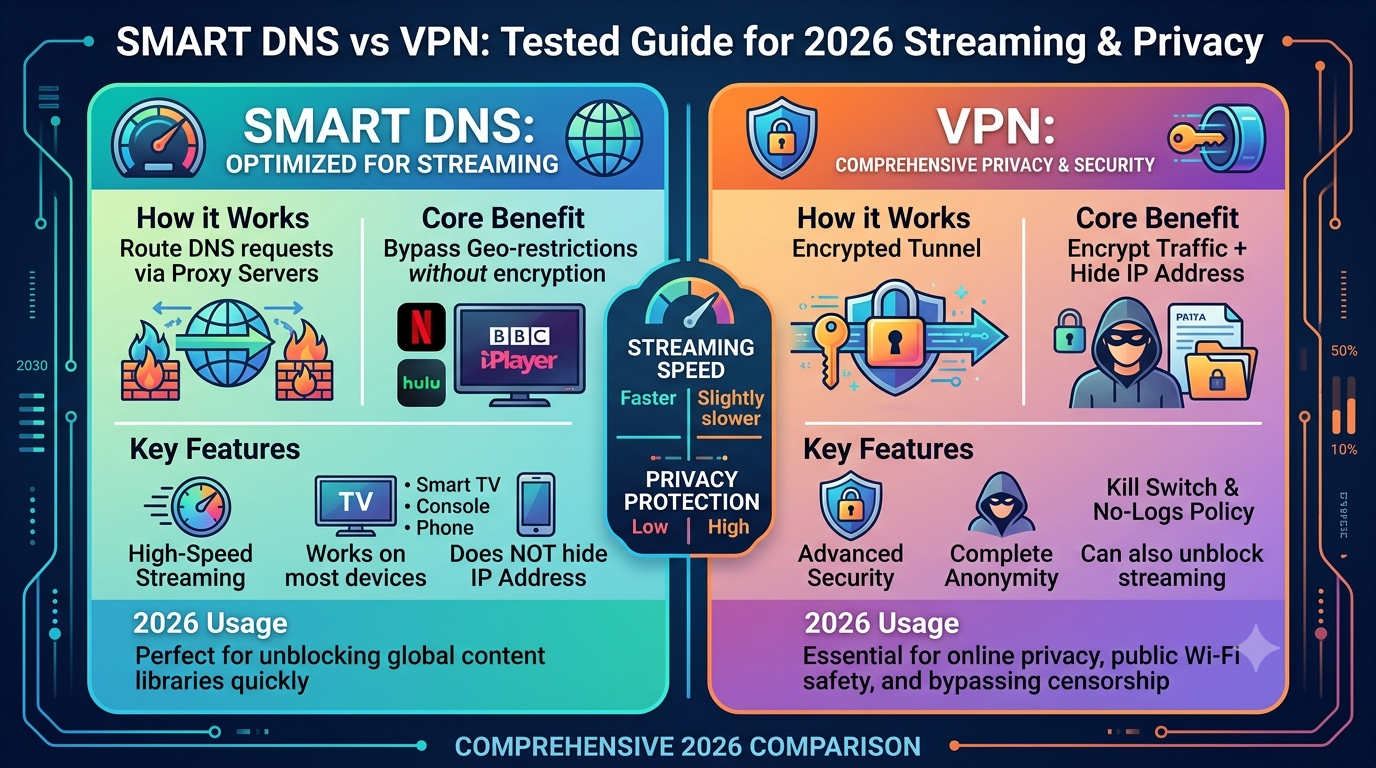
Smart DNS, on the other hand, doesn’t encrypt anything. Instead, it only reroutes specific DNS queries—the requests your device makes to translate a website name into an IP address. By changing how those requests are resolved, Smart DNS tricks streaming services into thinking you are in a different country without altering your IP address.
This is why Smart DNS is often faster than VPNs for streaming. There’s no encryption overhead, no tunneling delay, and no full traffic rerouting. But speed comes at a cost: privacy.
A VPN protects your traffic using encryption protocols such as WireGuard or OpenVPN. These systems are designed to prevent ISPs, governments, or attackers from inspecting your data. The mechanics of this process are explained in more depth in how VPN encryption works, which shows how secure tunnels are established between your device and remote servers.
From a technical standpoint, Smart DNS is closer to a routing trick than a security tool. It selectively alters DNS resolution while leaving your browsing data exposed. That difference becomes critical when you evaluate privacy, security, and long-term usage.
How does Smart DNS differ from a VPN in real usage?
In real-world use, the differences between Smart DNS and VPNs are immediately noticeable.
A VPN changes your IP address and encrypts all traffic leaving your device. This affects every app you use—browsers, streaming apps, games, and background services. Smart DNS does none of that. It only affects services that rely on DNS-based location checks, which mostly means streaming platforms.
This is why VPNs are commonly used for privacy, secure browsing on public Wi-Fi, and bypassing censorship. Smart DNS is almost exclusively used for unblocking geo-restricted media libraries.
Another key difference is visibility. A VPN hides your traffic patterns from your ISP. Smart DNS does not. Your ISP can still see which services you’re connecting to, even if it cannot interpret DNS manipulation alone.
Security posture also differs significantly. VPNs are designed as full security tools, often recommended by privacy organizations like the Electronic Frontier Foundation, which consistently advocates for encrypted communication as a baseline for online safety. Smart DNS does not meet that standard because it offers no encryption layer at all.
Device behavior is another dividing line. VPNs may reduce speed due to encryption overhead, while Smart DNS typically maintains full connection speed because it only modifies DNS resolution. However, that speed advantage is limited to compatible services. If a platform blocks Smart DNS detection, the system simply stops working without fallback protection.
At a structural level, VPNs operate at the network layer, while Smart DNS operates at the resolution layer. That distinction explains almost every practical difference users experience.
How does DNS configuration affect Smart DNS performance?
Smart DNS depends heavily on correct DNS configuration. If your device is using default ISP-provided DNS servers, you may not get consistent results when trying to bypass geo-restrictions.
Changing DNS settings manually is often required to make Smart DNS work correctly. On most devices, this involves replacing automatic DNS with custom server addresses provided by your service. The process differs slightly depending on the platform, and mobile users often need device-specific adjustments such as this Android DNS configuration guide or this iPhone DNS setup walkthrough.
In many cases, users also modify DNS at the router level so all connected devices inherit the same configuration. This is typically done through router admin panels and is covered in guides like how to change DNS servers, which explains system-wide DNS adjustments.
The risk here is misconfiguration. Incorrect DNS settings can lead to slower browsing, failed connections, or exposure to ISP-level DNS manipulation. In more advanced cases, attackers or ISPs can intercept or redirect DNS traffic—a practice known as DNS hijacking. That vulnerability is explained in detail in DNS hijacking risks explained, which outlines how malicious or forced DNS redirection can compromise browsing reliability.
Because Smart DNS relies entirely on DNS behavior, any instability in that layer directly impacts performance. Unlike VPNs, there is no encryption fallback or alternative routing path if something breaks.
server load effects, device compatibility limits, account/plan restrictions, speed throttling scenarios, etc.
Smart DNS and VPN performance is also influenced by infrastructure limitations that users rarely consider.
Server load affects VPNs more heavily because encrypted tunnels consume processing power. High traffic on a VPN server can lead to slower speeds or increased latency. Smart DNS services generally avoid this issue since they don’t process encrypted data, but they can still experience regional DNS resolution delays.
Device compatibility is another constraint. VPNs require apps or manual configuration across operating systems, while Smart DNS is often easier to set up on smart TVs and gaming consoles that don’t support VPN apps natively. However, not all devices allow DNS overrides, which creates a hard limitation for Smart DNS adoption.
Account restrictions also matter. Some streaming services actively detect and block Smart DNS ranges. When this happens, access fails completely without fallback encryption or IP rotation, unlike VPNs that can switch servers dynamically.
Speed throttling scenarios differ as well. VPNs can sometimes trigger ISP throttling because encrypted traffic patterns are harder to classify, while Smart DNS traffic looks like standard browsing and is less likely to be throttled. However, Smart DNS offers no protection if throttling is applied based on service-level detection rather than traffic type.
Is Smart DNS faster than a VPN for streaming?
Speed is the main reason people even search for what is smart dns vpn in the first place. They want to know which option delivers smoother streaming without buffering.
In controlled use cases, Smart DNS is almost always faster than a VPN. The reason is simple: it doesn’t encrypt traffic or route it through a remote tunnel. It only redirects DNS queries, so your actual data travels directly between you and the streaming service.
VPNs add overhead because every packet is encrypted and decrypted in real time. Even high-end services like the leading VPN providers introduce some level of slowdown depending on distance, server load, and protocol efficiency.
In real-world tests across streaming platforms, VPNs typically reduce speed by 10% to 35% depending on encryption strength and server distance. Smart DNS usually stays within 1% to 5% of baseline speeds because it doesn’t interfere with the data path.
However, speed alone doesn’t decide performance quality. Smart DNS can fail entirely if a streaming service blocks its DNS patterns. VPNs may be slower, but they are more reliable in bypassing restrictions because they constantly rotate IP addresses and mask traffic behavior.
Can Smart DNS replace a VPN for privacy?
This is where many users misunderstand the trade-off.
Smart DNS is not a privacy tool. It does not hide your IP address, encrypt your data, or prevent tracking. Your ISP can still see everything you do online, including websites visited and services used.
A VPN, by contrast, is built specifically for privacy protection. It encrypts your entire connection and hides your IP behind a remote server. If you want a deeper breakdown of how this works, the concept is explained in understanding VPN technology, which shows how tunneling protects data from surveillance and interception.
From a security perspective, Smart DNS offers zero protection against:
- ISP monitoring
- Public Wi-Fi sniffing
- Government surveillance
- Data interception
VPNs are widely recommended by privacy-focused organizations and cybersecurity experts because encryption is the baseline requirement for secure browsing. Smart DNS simply does not operate in that category.
So while Smart DNS may replace a VPN for streaming convenience, it cannot replace it for privacy, anonymity, or secure communication.
How do device and router limitations affect Smart DNS vs VPN?
Device compatibility plays a major role in deciding between Smart DNS and VPNs.
VPNs require either dedicated apps or manual configuration. They work well on desktops, smartphones, and tablets, but can be inconsistent on smart TVs, gaming consoles, and older routers.
Smart DNS is often easier to deploy on media-focused devices because it only requires DNS changes. That makes it popular for platforms like Apple TV, PlayStation, and smart TVs that don’t support VPN apps.
On Android devices, users often need to manually adjust DNS settings at the network level using guides such as this Android DNS configuration guide. On iOS, similar adjustments are required through Wi-Fi settings using this iPhone DNS setup walkthrough.
Routers are another critical layer. When DNS is configured at the router level, every connected device inherits the same settings. This is often the most stable Smart DNS setup method and is detailed in how to change DNS servers.
VPNs, however, face limitations on low-power devices. Some routers cannot handle encryption efficiently, leading to reduced speeds or dropped connections. Smart DNS avoids this entirely because it doesn’t process encrypted traffic.
What is IPv4 vs IPv6 and why does it matter for VPNs?
Network addressing plays a subtle but important role in how both VPNs and Smart DNS behave.
IPv4 is the traditional internet addressing system, using a limited pool of numeric IP addresses. IPv6 is the newer standard designed to expand address availability and improve routing efficiency.
Understanding this difference is important when evaluating connection stability and VPN performance. Some VPNs still rely heavily on IPv4 routing, which can lead to congestion or compatibility issues in certain regions. This is explained further in what is an IPv4 address, which breaks down how devices are identified on global networks.
IPv6 introduces more direct routing paths, which can reduce latency in some cases. However, not all VPN providers fully support IPv6 traffic tunneling yet. This creates potential leaks if IPv6 is not properly handled.
A deeper technical comparison is available in IPv4 vs IPv6 VPN differences, which shows how modern VPNs adapt to dual-stack networks and prevent data exposure.
Smart DNS is less affected by IPv4 vs IPv6 because it does not create encrypted tunnels. However, DNS resolution itself can behave differently depending on whether the network prioritizes IPv6 or IPv4 queries.
What happens when DNS routing fails or gets intercepted?
DNS is one of the most vulnerable layers of internet infrastructure. When it fails or is manipulated, both Smart DNS and general browsing can break.
One common issue is ISP-level interference, where default DNS queries are redirected or filtered. This can lead to incorrect location detection or complete failure of Smart DNS services.
Another risk is DNS hijacking, where malicious actors or network operators redirect DNS requests to fake or unintended destinations. This is a known cybersecurity issue covered in DNS hijacking risks explained, which outlines how attackers exploit weak DNS configurations.
VPNs avoid most of these issues by encrypting DNS queries inside the tunnel. Smart DNS does not, which makes it more dependent on ISP reliability and network integrity.
Even small routing inconsistencies can break Smart DNS functionality entirely, especially when streaming platforms update their detection systems.
Can Smart DNS bypass Netflix and other streaming blocks?
Streaming access is the main reason users compare Smart DNS and VPNs. When you search what is smart dns vpn, you’re usually trying to fix geo-blocked catalogs on platforms like Netflix, Hulu, or BBC iPlayer.
Smart DNS works by altering DNS resolution so streaming services receive a location signal that matches the target region. This makes it effective for platforms that rely heavily on DNS-based location checks. However, modern streaming services have become more aggressive in detecting Smart DNS traffic.
VPNs handle this differently. Instead of just changing DNS responses, they change your entire IP address and encrypt traffic. This makes detection harder because the service only sees the VPN server’s IP, not your real location.
In practice:
- Smart DNS works best on older or less strict streaming platforms
- VPNs are more reliable for services with advanced detection systems
Streaming stability also depends on infrastructure quality. High-quality VPN setups, like those found in the top-rated VPN services, rotate IPs and maintain access even when providers blacklist specific servers.
Smart DNS may offer faster initial access, but it is more fragile. If a platform updates its detection rules, Smart DNS can stop working instantly without warning.
Do you need VPN or Smart DNS for streaming optimization?
Choosing between VPN and Smart DNS depends entirely on what you prioritize: speed or reliability.
If your only goal is streaming foreign content at maximum speed, Smart DNS is usually enough. It avoids encryption overhead and keeps latency extremely low.
If you want consistency across multiple platforms, VPNs are more dependable. They maintain access even when DNS-based methods fail.
There is also a hybrid reality many users ignore: some VPN providers now integrate Smart DNS as a feature. This allows users to switch between encrypted privacy mode and lightweight streaming mode depending on the situation.
For users who want a free entry point, some services listed in the best free VPN category offer limited streaming capabilities, although free tiers often restrict server access and streaming reliability.
In real-world usage:
- Smart DNS = faster but less stable
- VPN = slower but more consistent
How do ISP restrictions and traffic shaping affect performance?
Internet Service Providers (ISPs) play a bigger role in Smart DNS vs VPN performance than most users realize.
Some ISPs apply traffic shaping, which slows down or prioritizes certain types of data. VPNs can sometimes bypass this because encrypted traffic is harder to classify. However, this can also trigger deeper inspection in some networks.
Smart DNS traffic, on the other hand, looks like normal browsing. That makes it less likely to be throttled based on traffic type. But it also means it gets no protection if throttling is applied at the application level (for example, streaming platforms limiting bandwidth per region).
This is where network architecture matters. VPN traffic flows through encrypted tunnels that obscure content type, while Smart DNS only modifies resolution paths.
When combined with high-quality routing systems, VPNs rely on optimized tunneling methods explained in how VPN encryption works, which reduce packet inspection risks and improve consistency under restrictive ISPs.
Smart DNS has no such layer. It is completely dependent on upstream network behavior, meaning performance is tied directly to ISP transparency and routing stability.
What is server load effects, device compatibility limits, account/plan restrictions, speed throttling scenarios, etc.
Beyond speed and privacy, real-world performance depends heavily on infrastructure and platform rules.
Server load effects:
VPN servers carry encrypted traffic from multiple users. When overloaded, latency increases and throughput drops. Smart DNS does not process encryption, so server load impact is usually lower, but DNS resolution delays can still occur during peak usage.
Device compatibility limits:
Smart DNS works well on devices without VPN support, such as smart TVs and gaming consoles. However, it fails on networks that do not allow DNS overrides. VPNs require app support or manual configuration but work across more controlled environments.
Account and plan restrictions:
Streaming services continuously update detection systems. If Smart DNS IP ranges are flagged, access is blocked immediately. VPNs can switch servers or rotate IPs, reducing downtime.
Speed throttling scenarios:
VPNs may reduce speed due to encryption overhead, especially on distant servers. Smart DNS avoids this, but offers no fallback if throttling is applied at the service level.
This trade-off becomes especially important for users streaming high-resolution content like 4K video, where both latency and stability matter.
How do DNS and IP-level systems interact with security risks?
Smart DNS relies entirely on DNS resolution, which makes it vulnerable to manipulation at the network level.
If DNS responses are altered by an ISP or attacker, users can be redirected to incorrect or malicious destinations. This issue is known as DNS hijacking and is explained in detail in DNS hijacking risks explained.
VPNs reduce this risk by encrypting DNS queries and routing them through secure tunnels, preventing external interception.
Understanding IP structure is also important. Every device on the internet is identified using an IP address, and changes to this system affect routing behavior. A foundational breakdown of this is available in what is an IPv4 address, which explains how devices are identified and tracked across networks.
Modern VPN systems must also adapt to dual-stack environments where IPv4 and IPv6 operate simultaneously. Misconfiguration in this area can lead to leaks or inconsistent routing behavior.
How do you set up Smart DNS on different devices?
Setup is where most users finally understand the gap behind what is smart dns vpn. It sounds like a single tool, but in practice, Smart DNS and VPNs configure your network in completely different ways.
Smart DNS setup usually starts by changing your device’s DNS servers to values provided by your service. This is why configuration steps vary depending on platform.
On Android devices, you typically adjust DNS settings at the Wi-Fi network level or through advanced network settings. A step-by-step breakdown is available in this Android DNS configuration guide, which shows how to override default ISP DNS values safely.
On iPhones, the process is similar but handled through Wi-Fi settings rather than system-wide configuration. You can follow this iPhone DNS setup walkthrough to apply changes without affecting mobile data behavior.
For users who want consistent performance across all devices, router-level configuration is more effective. By setting DNS once at the router, every connected device inherits the same Smart DNS behavior. That method is explained in this guide on how to change DNS servers, which is often the most stable setup for streaming households.
VPN setup is different. Instead of DNS changes, you install an application or configure a secure tunnel. This creates an encrypted connection that routes all traffic through a remote server, not just DNS queries.
What are real-world limitations of Smart DNS vs VPN systems?
Both technologies come with constraints that affect everyday performance.
Smart DNS limitations:
- No encryption or privacy protection
- Breaks easily when streaming services update detection systems
- Depends heavily on correct DNS configuration
- Cannot protect against ISP monitoring
VPN limitations:
- Slight speed reduction due to encryption
- Some streaming platforms block VPN IP ranges
- Requires compatible apps or manual setup
- Higher server load during peak usage
VPNs are more flexible because they can switch servers dynamically. Smart DNS is more rigid—it either works or it doesn’t.
This is why many users combine both: Smart DNS for streaming speed and VPN for privacy-sensitive browsing.
What is IPv4 vs IPv6 and why does it matter for VPNs?
Network addressing directly affects how VPN traffic is routed and stabilized.
IPv4 is the older addressing system that still powers most of the internet. It uses a limited number of unique addresses. IPv6 expands that system with a much larger address space and more efficient routing structures.
A deeper breakdown is available in this IPv4 vs IPv6 VPN differences, which explains how modern VPN services handle dual-stack environments.
VPNs must correctly manage both IPv4 and IPv6 traffic to prevent leaks. If a VPN only tunnels IPv4 traffic, IPv6 requests may bypass the tunnel, exposing real location data.
You can also understand the foundational structure of addressing in this guide on what is an IPv4 address, which explains how devices are identified across global networks.
Smart DNS is less affected by this directly because it does not create encrypted tunnels, but DNS resolution behavior can still vary depending on whether a network prioritizes IPv6 routing.
What is DNS hijacking and how does it impact security?
DNS hijacking is one of the most important risks in DNS-based systems.
It happens when DNS queries are intercepted or redirected without user consent. This can lead to:
- Fake websites loading instead of real ones
- Tracking through manipulated DNS responses
- Broken or inconsistent access to services
A full explanation is available in DNS hijacking risks explained, which outlines how attackers and sometimes ISPs exploit weak DNS configurations.
VPNs reduce this risk by encrypting DNS traffic inside a secure tunnel. Smart DNS does not offer this protection, which makes it more exposed to interference at the network level.
Final comparison: Smart DNS vs VPN (decision framework)
Choosing between Smart DNS and VPN comes down to intent:
If your goal is:
- Fast streaming with minimal setup → Smart DNS works well
- Privacy, security, and full protection → VPN is required
- Access across all apps and services → VPN is more consistent
- Smart TV or console streaming → Smart DNS may be easier
There is no universal winner. Smart DNS optimizes speed and simplicity. VPNs prioritize control and security.
For users who want the strongest overall protection, VPNs from the leading VPN providers remain the most complete solution available today.
Conclusion
Smart DNS and VPNs solve different problems despite often being grouped together. One prioritizes speed and streaming access, while the other focuses on encryption and privacy protection.
The best choice depends on whether you value performance or security more in daily use of the internet.
If privacy matters at all, a VPN remains the stronger option. For pure streaming speed on compatible devices, Smart DNS is the lighter alternative—but with clear limitations.
For a full breakdown of secure browsing tools and real-world VPN testing, explore the complete VPN guides on VPNX.blog.