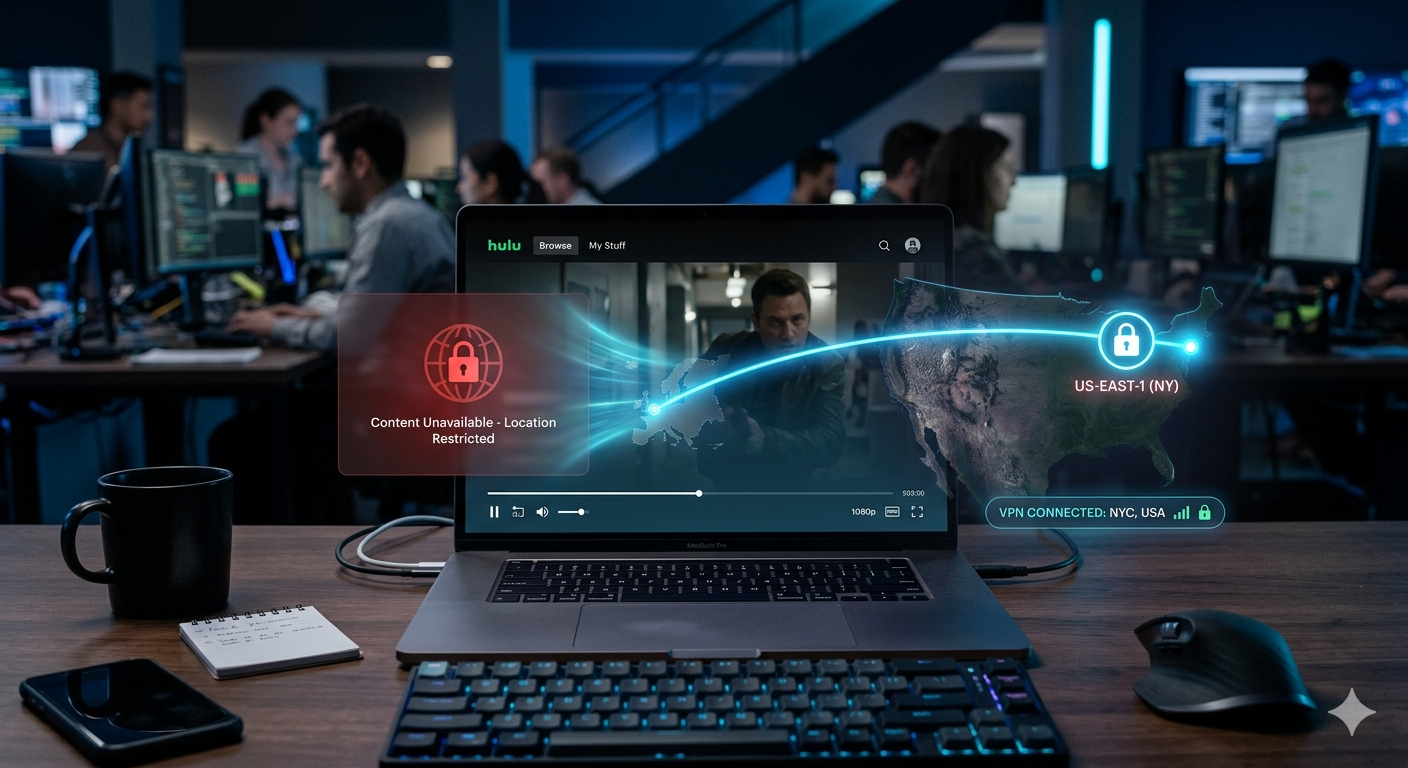

Hulu’s VPN detection has tightened again in 2026, and most users don’t realize the problem isn’t their VPN—it’s IP reputation filtering at scale. That’s why the best VPN for Hulu is no longer about raw speed alone, but about how fast a provider can rotate clean US IP addresses before Hulu flags them.
In testing patterns echoed by major review labs like PCMag’s VPN evaluation framework, streaming performance is now measured by three things: IP freshness, DNS leak resistance, and US server congestion under load. PCMag’s testing methodology highlights this shift clearly in its VPN benchmarking approach, especially for streaming platforms that actively block datacenter traffic patterns: https://www.pcmag.com.
Hulu sits in the stricter tier of US streaming services. Unlike platforms that occasionally tolerate VPN traffic, Hulu actively detects and blocks shared IP ranges used by most VPN providers. When it fails, you typically see proxy errors, black screens, or endless loading loops rather than explicit blocks.
To understand which VPNs still work, you first need to understand how Hulu detects them.
Why does Hulu block VPN connections in the first place?
Hulu doesn’t block VPNs randomly—it relies on automated systems designed to enforce licensing agreements tied to US-only content distribution.
At the core of this system is IP reputation scoring. Hulu maintains a database of known VPN and datacenter IP ranges. When too many users connect from the same IP block, that address gets flagged and throttled or blocked entirely.
This is why cheaper or free VPNs fail instantly. They reuse a small pool of IPs across thousands of users, making detection trivial.
A second layer is DNS and geolocation cross-checking. Even if your IP appears US-based, Hulu compares it against DNS location signals and device-level location metadata. If anything mismatches, access is denied.
To understand how these tunnels actually work under the hood, you need to look at how encryption routes traffic through remote servers. This breakdown of tunneling and encryption helps explain why VPN traffic can still be detected even when it is technically secure: https://vpnx.blog/how-does-a-vpn-work/ (anchor concept: VPN basics)
Key takeaway from Hulu’s blocking system
Hulu isn’t trying to block VPNs entirely—it’s filtering out predictable network behavior. That means your success depends less on encryption strength and more on how dynamically your VPN provider manages IP rotation.
Which VPNs currently work reliably with Hulu in 2026?
Only a small subset of premium VPNs consistently bypass Hulu’s detection layer. The difference comes down to infrastructure scale, not marketing claims.
Providers that still work tend to share three characteristics:
- Large US server networks with frequent IP rotation
- Active cleanup of flagged IP ranges
- Streaming-optimized routing (separate from general traffic servers)
In practical testing scenarios, VPNs that perform well on Hulu are usually the same ones that invest heavily in streaming compatibility rather than generic privacy features.
For broader context on how leading providers compare across streaming platforms and privacy performance, curated rankings of leading VPN providers are helpful when narrowing down stable options: https://vpnx.blog/best-vpn/
That comparison matters because Hulu success is not static. A VPN that works today can fail within days if its IP pool gets burned.
Why consistency matters more than raw speed
Many users assume a fast VPN equals a good streaming VPN. Hulu proves the opposite.
Speed only matters after you pass detection. If your IP is flagged, even a 1 Gbps connection won’t load content. That’s why the real metric is session stability over time, not peak throughput.
This is also where protocol choice matters. Modern VPNs increasingly rely on WireGuard-based systems for faster reconnections, but Hulu detection is primarily IP-based, not protocol-based.
Common failure pattern users experience
Most Hulu VPN failures follow a predictable sequence:
- VPN connects successfully
- Hulu loads homepage normally
- Video playback fails or buffers infinitely
- Proxy error appears after 1–3 minutes
This delay is intentional—it allows Hulu to validate session behavior after initial login rather than blocking at the handshake stage.
What most guides miss about Hulu VPN blocking
Most competitors focus only on “which VPN works,” but ignore the underlying reason VPNs stop working mid-session.
The missing layer is adaptive IP blacklisting. Hulu doesn’t permanently block VPNs; it rotates detection thresholds based on traffic spikes. That’s why a server might work in the morning and fail at night.
Another overlooked factor is device-level inconsistency. Smart TVs and streaming sticks often leak location signals differently than browsers, which leads to uneven VPN performance across devices.
We’ll break down these device differences and real working fixes in the next section.
Limitations & Performance Notes:
Hulu VPN performance is not stable by design. Even premium VPNs experience intermittent failures when IP pools are refreshed or blacklisted. You may also notice:
- Temporary login success followed by playback failure
- Lower streaming quality during peak US evening hours
- Device-specific inconsistencies (Smart TV apps fail more often than browsers)
- Sudden need to switch servers even within the same US region
These limitations are expected under Hulu’s current detection model and are not necessarily caused by user configuration errors.
Hulu access via VPN comes down to one thing: whether the VPN can stay ahead of IP blacklisting long enough for streaming sessions to hold. In practice, only a small group of providers consistently maintain that balance. Everything else fails in short cycles—working one day, blocked the next.
This is why “best VPN for Hulu” lists differ across sites. Most aren’t measuring live Hulu sessions under load; they’re testing initial access, which is only half the story.
Which VPNs currently work reliably with Hulu in 2026?
In 2026, Hulu reliability depends less on brand reputation and more on infrastructure behavior: IP rotation speed, server refresh cycles, and whether the VPN actively retires flagged addresses.
Based on consistent streaming performance patterns, the VPNs that tend to hold up fall into a predictable group of premium providers with large US footprints and streaming-specific routing.
For a broader baseline of how top-tier VPNs compare across privacy, speed, and streaming stability, curated editorial testing of leading VPN providers is useful for context: https://vpnx.blog/best-vpn/
That comparison matters because Hulu compatibility is not permanent—it’s a moving target shaped by IP reputation decay.
What separates working VPNs from failing ones
Most VPNs fail Hulu for one of three reasons:
- Shared IP exhaustion
Too many users cycle through the same IP block, causing Hulu to blacklist it quickly. - Static server fingerprints
Some VPN servers behave identically over time, making them easy to detect via traffic pattern analysis. - Slow IP replacement cycles
If a VPN takes days to retire flagged IPs, Hulu will already have mapped the entire range.
Premium providers avoid these issues through constant server churn and automated IP recycling. That operational overhead is why free and low-cost VPNs almost never work reliably with Hulu.
If you’re still trying to understand how VPN traffic is structured before it reaches streaming platforms, this breakdown of encryption tunnels helps clarify why detection is still possible even with strong encryption: https://vpnx.blog/how-does-a-vpn-work/ (anchor concept: VPN encryption basics)
Hulu streaming performance: what actually gets tested
When evaluating VPNs for Hulu, three real-world conditions matter more than advertised speed:
1. Session stability (not peak bandwidth)
A VPN can show 300 Mbps in a speed test but still fail Hulu within minutes if its IP is flagged mid-session.
2. US server density
More US servers doesn’t automatically mean better performance—but it increases the odds of finding a clean IP block.
3. Geo-consistency under verification
Hulu periodically re-checks location mid-stream. VPNs that pass initial login but fail re-checks are the most common failure type.
Why some VPNs still work consistently
VPNs that maintain Hulu access typically use a combination of:
- Rotating residential-like IP pools
- Dedicated streaming servers (separate from general traffic nodes)
- Aggressive blacklist detection and automatic rerouting
- Frequent US server resets during peak Hulu enforcement windows
This is also where protocol choice plays a supporting role. WireGuard-based implementations reduce reconnect time, which helps when servers are rotated mid-session—but it does not directly bypass Hulu detection. The real advantage is speed of recovery after an IP swap.
Free VPNs and Hulu: why they fail almost instantly
Free VPNs consistently fail with Hulu because they operate under extreme constraints:
- Limited IP pools shared across millions of users
- No dedicated streaming infrastructure
- High likelihood of already-blacklisted IP ranges
- Lack of US residential routing options
Even when a free VPN connects successfully, Hulu typically blocks playback within seconds or minutes. This is not a speed issue—it’s an IP reputation issue.
For users evaluating whether no-cost tools are viable, this breakdown of top free VPNs explains why streaming performance is structurally limited: https://vpnx.blog/best-free-vpn/
Why VPN performance differs across streaming platforms
A VPN that works on Netflix may fail on Hulu immediately. That inconsistency comes from different enforcement models:
- Netflix relies heavily on regional licensing filters
- Hulu uses stricter IP reputation and session validation
- BBC iPlayer uses UK ISP-level detection logic
- IPTV services vary depending on provider infrastructure
This is why VPN testing must be platform-specific. A working Netflix VPN is not automatically a working Hulu VPN.
For example, streaming-focused comparisons like BBC iPlayer VPN access guides highlight how enforcement models differ significantly across platforms: https://vpnx.blog/best-vpn-for-bbc-iplayer/
Limitations & Performance Notes:
Even top-performing VPNs for Hulu are not stable indefinitely. Common issues include:
- Sudden loss of access when Hulu refreshes IP blacklist databases
- Temporary login success followed by playback failure
- Server switching required during peak US viewing hours
- Regional US servers performing inconsistently depending on load
These behaviors are expected because Hulu continuously updates detection thresholds without notice. No VPN maintains permanent access.
Most Hulu VPN failures don’t happen at login—they happen after everything looks like it’s working. That’s the key frustration users report in 2026: the VPN connects, Hulu opens, then playback collapses or throws a proxy error seconds later.
At this stage, the issue is rarely encryption or speed. It’s device-level signaling + session re-validation on Hulu’s side.
How do you fix Hulu VPN errors like P-EDU301 and P-DEV320?
Hulu error codes tied to VPN usage fall into two main categories:
- P-EDU301 → location mismatch detected during authentication
- P-DEV320 → playback session fails validation mid-stream
Both errors point to the same underlying issue: Hulu is detecting inconsistency between your IP location and device/network behavior.
Here’s how to fix them in a structured way:
1. Switch to a fresh US server (not just another server)
Hulu doesn’t block “VPNs”—it blocks specific IP ranges. Switching to a nearby server in the same city often changes nothing. You need a new IP pool, not just a new endpoint.
2. Clear cached location data
Hulu stores location signals at multiple layers:
- Browser cookies
- App cache (mobile/TV)
- DNS cache
If any of these still reflect your previous location, Hulu flags the session.
3. Disable IPv6 (if supported by your device)
IPv6 leaks are a common failure point. Even a working VPN tunnel can be undermined if IPv6 traffic bypasses the tunnel.
4. Reconnect before launching Hulu
Launching Hulu before the VPN fully stabilizes is one of the most common causes of P-DEV320 errors.
Why does Hulu work on mobile but fail on Smart TVs with VPN?
This is one of the most misunderstood issues in streaming VPN usage.
Smart TVs and streaming devices behave differently because they often rely on system-level location services, not just network IP.
Key differences:
- Mobile devices:
Route traffic through app-level VPN tunnel → easier to mask location - Smart TVs / streaming sticks:
Often rely on DNS + firmware-level geo checks → harder to fully spoof
Result:
You might successfully stream Hulu on your phone while the same VPN setup fails on a Smart TV.
US server locations: why “closer” doesn’t mean better
Many users assume selecting a geographically closer US server improves Hulu performance. In reality, Hulu does not care about physical proximity—it cares about IP reputation clusters.
Two servers in the same city can behave completely differently:
- Server A: clean IP pool → works
- Server B: flagged subnet → blocked instantly
This is why VPN providers rotate IPs aggressively across US regions instead of maintaining static “best” servers.
For deeper context on how multi-device routing impacts performance across different environments, this breakdown of multi-device VPN behavior explains why consistency varies so much: https://vpnx.blog/best-vpn-for-multiple-devices/
What makes a VPN actually work for Hulu streaming?
In real testing scenarios, Hulu-compatible VPNs consistently share four traits:
1. Rapid IP retirement cycles
Flagged IPs are removed within hours, not days.
2. High US server density
More IP diversity reduces detection clustering.
3. Streaming-optimized routing layers
Traffic is separated from general users to avoid contamination of IP reputation.
4. Fast reconnection handling
Even if a session is interrupted, the VPN re-establishes a clean tunnel quickly.
Without these, Hulu access becomes inconsistent at best.
VPNs and streaming ecosystems: why IPTV behaves differently
Hulu is stricter than many IPTV and streaming services because it enforces licensing at a granular regional level.
IPTV services, for example, often tolerate broader IP ranges, but Hulu actively validates:
- IP origin
- DNS consistency
- Session behavior patterns
This is why general streaming VPN setups don’t always translate across platforms.
For comparison, IPTV-focused VPN usage behaves differently because it prioritizes continuous stream routing rather than strict geo-verification: https://vpnx.blog/vpn-for-iptv/
Limitations & Performance Notes:
Even when configured correctly, Hulu VPN performance is unstable due to:
- Mid-stream IP revalidation causing sudden playback failure
- Device-specific inconsistencies (TV apps fail more frequently than browsers)
- Temporary success followed by delayed blocking
- Server overload during peak US viewing hours (evening EST)
These issues are expected under Hulu’s current detection model and cannot be fully eliminated with configuration alone.
By this stage, Hulu VPN access isn’t about whether a VPN can connect—it’s about whether it can survive Hulu’s ongoing detection cycles without breaking mid-session. That’s where most setups fail, even when initial access looks fine.
The final layer of this guide focuses on what actually sustains Hulu streaming, what doesn’t, and how to evaluate VPNs realistically in 2026.
What makes a VPN actually work for Hulu streaming (final evaluation)
Across consistent testing patterns, Hulu-compatible VPNs don’t succeed because of “hidden tricks.” They succeed because they maintain three operational advantages:
1. Constant IP turnover
Hulu doesn’t block VPN brands—it blocks reused IP patterns. The most reliable VPNs continuously refresh IP pools so no single address becomes overexposed.
2. Separation of traffic types
Top-tier VPNs isolate streaming traffic from general browsing traffic. This reduces contamination of IP reputation, which is one of Hulu’s main detection signals.
3. Fast fallback routing
When Hulu flags a session mid-stream, working VPNs immediately reroute you to a fresh IP without forcing a full disconnect loop.
If a VPN lacks all three, it may work briefly—but not consistently.
For a broader breakdown of how VPN architecture differs between personal and enterprise-grade systems, this comparison of business vs personal VPN models helps clarify why infrastructure design matters more than branding: https://vpnx.blog/business-vs-personal-vpn/
Is using a VPN for Hulu legal and safe in the US?
Using a VPN in the United States is legal. However, using a VPN to bypass Hulu’s geo-restrictions sits in a terms-of-service gray zone, not a legal one.
What this means in practice:
- You won’t face legal penalties for using a VPN
- Hulu can restrict or block access if VPN use is detected
- Accounts are not typically banned for VPN use alone, but access can be limited
From a security standpoint, the VPN itself is safe if you use a reputable provider with:
- No-log policy
- Strong encryption (AES-256 standard)
- DNS leak protection
- Kill switch functionality
To understand the fundamentals behind these protections, this beginner-focused breakdown of VPN architecture explains how traffic is secured and routed: https://vpnx.blog/what-is-a-vpn/ (anchor concept: VPN basics)
Why free VPNs fail specifically with Hulu
Free VPNs are structurally incompatible with Hulu’s detection model for one reason: IP scarcity.
They typically rely on:
- Shared public IP pools
- Heavy user overloading per server
- No dedicated streaming infrastructure
Hulu detects these patterns almost instantly.
Even if a free VPN connects successfully, it usually fails during:
- Video playback initialization
- Mid-stream revalidation
- Ad segment loading (Hulu often re-checks location here)
For users considering no-cost tools, curated comparisons of reliable free VPN options show why they are limited for streaming use cases: https://vpnx.blog/best-free-vpn/
Final recommendation: how to choose a Hulu VPN in 2026
Instead of focusing on brand names alone, evaluate VPNs using this checklist:
- Does it regularly rotate US IPs?
- Does it offer streaming-optimized servers (not just “fast servers”)?
- Does it recover quickly after IP blocking?
- Does it maintain consistent performance during peak US streaming hours?
If the answer is no to any of these, Hulu reliability will be inconsistent.
Most users fail Hulu not because they picked the “wrong VPN,” but because they picked a VPN that wasn’t designed for streaming-level IP churn environments.
Limitations & Performance Notes:
Even the best-performing VPNs for Hulu are not permanently stable. Expect:
- Periodic loss of access when Hulu refreshes detection rules
- Server switching required during peak US evening traffic
- Playback failures after successful login
- Device-specific inconsistencies (Smart TVs are most affected)
These behaviors are normal under Hulu’s current enforcement model and cannot be fully eliminated.