
If you’re trying to figure out how to connect real debrid to stremio, the key thing to understand is that this isn’t a single “toggle-on” feature. It’s a chain of authentication and add-on configuration steps that link Stremio to Real-Debrid through a third-party provider like Torrentio. Once set up correctly, you get access to faster, cached streams instead of unreliable peer-based sources.
Before diving in, it helps to understand the broader privacy and routing layer behind modern streaming setups. Tools like VPNs are often used alongside these systems to protect traffic visibility and reduce ISP throttling. If you’re new to this, the Electronic Frontier Foundation offers a solid breakdown of tracking and privacy risks in streaming environments at https://www.eff.org/issues/privacy.
For context, a VPN works by routing your traffic through an encrypted tunnel, masking your IP and preventing network-level monitoring. You can explore the fundamentals in this guide on VPN basics and how how virtual private networks operate. If you’re evaluating tools for privacy while streaming, you can also compare options in this breakdown of leading VPN providers.
Stremio itself is just a media hub. It doesn’t host content—it aggregates streams through add-ons. That’s why understanding what Stremio actually does is important before you start configuring Real-Debrid. You’ll also need to properly install extensions, which is covered in this guide on installing Stremio add-ons correctly.
How do you connect Real-Debrid to Stremio step by step?
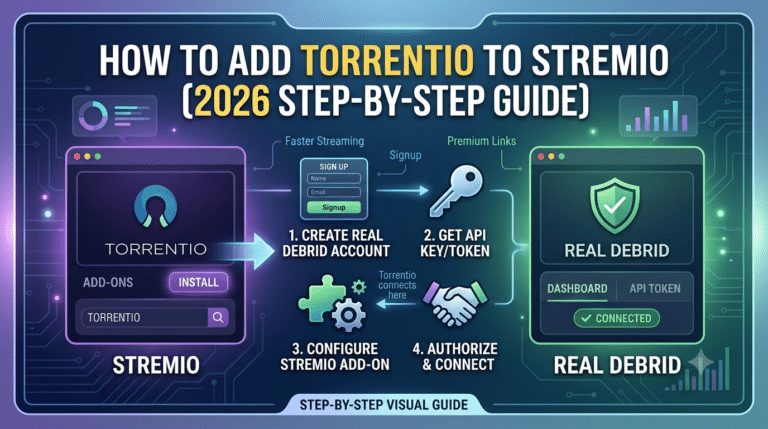
The actual connection process works through Torrentio, which acts as the bridge between Stremio and Real-Debrid’s cached torrent network. Without it, Stremio has no way to request RD-backed streams.
Here’s the clean setup flow:
Step 1: Create or log into Real-Debrid
You need an active Real-Debrid account. Once logged in, go to the API section in your account settings and generate your authorization token. This token is what links external apps to your account.
Step 2: Open Torrentio configuration page
Torrentio is not installed directly from inside Stremio in most cases. Instead, it’s configured via its web setup page. During setup, you’ll be prompted to enter your Real-Debrid API key.
This is the most critical step in the entire process. A wrong token or expired session will result in missing streams later.
Step 3: Install Torrentio in Stremio
After configuration, Torrentio generates an installation link. When you open it, Stremio will prompt you to install the add-on.
At this point, Stremio begins pulling in external stream sources based on your settings.
If you’re not familiar with how add-ons behave, it’s worth understanding the full ecosystem in this breakdown of Stremio add-on behavior and sources.
Step 4: Verify RD+ streams inside Stremio
Once installed, open any title and look for “RD+” labels. These indicate cached Real-Debrid sources, which are typically faster and more stable than standard torrent peers.
If nothing appears, the issue is almost always related to authentication or misconfiguration—not Stremio itself.
At a system level, this setup depends on multiple moving parts working together: Stremio as the interface, Torrentio as the scraper, and Real-Debrid as the caching layer. If any one of these breaks, the chain fails.
For users concerned about privacy or ISP visibility, this is where a VPN becomes relevant again. Even though Real-Debrid handles caching, your ISP can still see metadata patterns unless traffic is encrypted. You can evaluate low-cost options using reliable free VPN services if you’re testing setups before committing to a paid plan.
server load effects, device compatibility limits, account/plan restrictions, speed throttling scenarios, etc.
Real-Debrid performance is not just about setup—it’s also shaped by infrastructure and limits on both sides. Server load on RD endpoints can affect how quickly cached streams are retrieved, especially during peak hours. Device compatibility also matters: older Firestick or Android TV builds may struggle with large cached files or long buffer streams.
On the account side, Real-Debrid enforces simultaneous stream limits depending on your plan tier. If you exceed active sessions, streams may fail silently without clear error messages. ISP throttling is less common with RD-backed streams, but it can still occur on non-cached sources or misconfigured setups.
Understanding these constraints early prevents most “it’s not working” situations later in the setup process.
What is Torrentio and why is it required for Real-Debrid setup?
Torrentio is the missing bridge that makes the entire Real-Debrid + Stremio setup function. Stremio on its own does not fetch external torrent or cached sources. Torrentio handles that job by indexing providers and forwarding stream options into the Stremio interface.
When you search for a movie or series in Stremio, Torrentio scans multiple torrent indexes in real time. If Real-Debrid is connected, it prioritizes cached copies instead of raw peer-to-peer torrents. That’s where the performance gain comes from—no waiting for seeders, no unstable sources, and far fewer buffering interruptions.
Without Torrentio, Real-Debrid cannot integrate into Stremio at all. That’s why most setups fail when users skip configuration or install the add-on incorrectly.
For users still building familiarity with the ecosystem, it helps to understand how Stremio handles extensions in general. The platform depends heavily on modular add-ons, which is explained in detail in this breakdown of installing Stremio add-ons correctly.
Once Torrentio is active, it becomes the primary pipeline for all external stream discovery.
Where do you find and use the Real-Debrid API key in Stremio?
The Real-Debrid API key is the authentication layer that links your account to Torrentio. Without it, Torrentio behaves like a standard torrent indexer with no premium caching.
You generate this key directly from your Real-Debrid account dashboard. It is usually labeled as an “API Token” or “authorization key.” Once generated, it stays active unless you manually revoke it.
Step-by-step usage inside Torrentio:
- Open the Torrentio configuration page in your browser
- Locate the “Real-Debrid API Key” field
- Paste your token exactly as shown (no spaces or edits)
- Save settings and generate the installation link
- Open the link in Stremio to finalize setup
A common mistake is copying an expired or partially copied token. Even a single missing character will break the authentication chain, leading to empty or missing stream results.
At this stage, users often expect immediate playback improvements. In reality, Stremio still requires proper catalog syncing and add-on recognition before RD+ streams fully populate.
How do you verify Real-Debrid is working inside Stremio?
Once Torrentio is installed and linked, open any popular title. If everything is configured correctly, you should see streams labeled “RD+.” These are cached versions stored on Real-Debrid’s servers.
If only standard torrent sources appear, the issue is usually one of three things:
- API key mismatch or expired token
- Torrentio not properly installed inside Stremio
- Real-Debrid account not active or unrestricted
At this point, it’s also important to ensure your Stremio environment is properly synced across devices. Many users install Torrentio on one device but forget that add-ons need consistent configuration across platforms. This is covered in detail in this guide on syncing Stremio add-ons across devices.
Why setup differences appear across devices
Stremio behaves slightly differently depending on the platform. Android TV, Firestick, desktop, and mobile versions all use the same add-on system, but caching and stream resolution handling vary.
Firestick devices, for example, often struggle with large RD cached streams due to limited memory. Desktop setups tend to load more stable streams because of better network handling and fewer hardware constraints.
If you’re using a streaming stick, it’s also worth understanding device-level limitations that can affect playback consistency. This becomes more noticeable when switching between high-bitrate and low-bitrate cached sources.
For users who are still learning playback navigation inside the app, this walkthrough on how to watch on Stremio helps clarify how streams are selected and launched after setup.
What changes after Real-Debrid is connected?
Once the integration is complete, Stremio’s behavior changes in three key ways:
First, stream selection becomes faster. Instead of waiting for torrent peers, RD+ sources load instantly from cached servers.
Second, stream quality becomes more consistent. You’ll notice fewer broken links and fewer playback errors compared to standard torrent-based results.
Third, catalog reliability improves. Because Torrentio prioritizes cached content, older or low-seed titles often become playable again.
However, this improvement depends heavily on correct configuration. If Torrentio is misconfigured, Stremio will fall back to standard sources without warning.
At a broader level, this system reflects how modern streaming add-ons operate. Instead of hosting content, they aggregate distributed sources and optimize delivery paths.
For users exploring the full ecosystem, it’s also important to understand how content sourcing works in Stremio overall. This is explained in this guide on how Stremio sources content, which breaks down how add-ons interact with external indexes.
Why are no streams showing after connecting Real-Debrid?
When users finish setup and still see empty results, the problem is almost never Stremio itself. It’s usually a breakdown in the pipeline between Torrentio, Real-Debrid, and your API authentication.
The most common failure point is an invalid or expired API token. Real-Debrid tokens can be revoked or invalidated if you regenerate credentials or log out of linked sessions. When that happens, Torrentio continues to load—but without access to cached RD sources.
Another frequent issue is misconfigured Torrentio settings. If provider filters are too strict or categories are disabled, the add-on may return no results even though RD is working correctly.
A smaller but important factor is Real-Debrid account status. Expired subscriptions immediately stop RD+ stream availability, even if Stremio appears fully configured.
For users still learning the ecosystem, it helps to revisit how the platform actually functions as a media hub. Stremio doesn’t host anything—it only aggregates sources through extensions, which is explained in detail in this breakdown of what Stremio actually does.
How do device limits and account restrictions affect Stremio performance?
Real-Debrid enforces strict session rules depending on your account type. If you exceed the allowed number of simultaneous IPs or active streams, new playback attempts may fail silently.
This often confuses users because Stremio does not always display clear error messages when RD limits are hit. Instead, streams simply stop appearing or fail to load.
Device behavior also varies significantly:
- Smart TVs and Firestick devices often struggle with large cached files due to limited RAM
- Android TV boxes perform better but can still hit buffer limits under high bitrate streams
- Desktop apps handle RD streams more efficiently due to stronger decoding and network stacks
- Mobile devices may reduce stream quality automatically depending on bandwidth conditions
If you’re using multiple devices under one Real-Debrid account, session overlap can also trigger hidden restrictions. This is one of the most overlooked causes of missing streams.
Users trying to understand whether the platform itself is reliable should also consider basic legitimacy and safety context. Independent analysis of ecosystem risks is covered in this breakdown of is Stremio legit and safe to use.
Is Real-Debrid safe and how does it integrate with streaming add-ons?
Real-Debrid itself does not host content. It acts as a caching and delivery optimization layer. When Torrentio finds a torrent, Real-Debrid checks if it already has a cached copy. If it does, it serves that file directly through high-speed servers.
This means your device is never directly connecting to peer-to-peer torrent networks when RD+ streams are used. Instead, you’re pulling from pre-fetched content stored in secure infrastructure.
The integration with Stremio works through API authentication. Once your token is validated, Torrentio can request cached links from Real-Debrid on your behalf and pass them into the Stremio interface.
At a technical level, this reduces exposure to unstable peers and improves stream reliability. However, it does not make the system immune to misconfiguration or account-level restrictions.
For users looking to understand how content flows through add-ons more broadly, this breakdown of how Stremio sources content explains the full ecosystem structure.
How do you fix common Torrentio and RD integration issues?
Most Real-Debrid + Stremio problems fall into predictable categories. Fixing them requires isolating where the chain breaks.
1. No RD+ streams appearing
This usually means:
- API key is invalid
- Torrentio was installed without RD configuration
- Real-Debrid subscription is inactive
Reconfiguring Torrentio and reinstalling it into Stremio typically resolves this.
2. Streams load but fail to play
This often indicates:
- Device decoding limitations
- Temporary Real-Debrid server congestion
- ISP-level buffering or throttling
Switching to a lower-bitrate stream or restarting the app often fixes playback.
3. Torrentio not loading at all
This is typically a network or extension issue:
- DNS filtering blocking add-on requests
- Browser issues during configuration
- Corrupted Stremio add-on cache
Reinstalling Torrentio from scratch is the most reliable fix.
4. Streams appear inconsistently across devices
This usually happens when:
- Add-ons are not synced properly
- Different Stremio versions are installed
- Device caches are out of date
Ensuring consistent add-on configuration across devices is critical for stable performance.
If you’re still struggling with device consistency, this guide on syncing Stremio add-ons across devices provides a structured fix approach.
server load effects, device compatibility limits, account/plan restrictions, speed throttling scenarios, etc.
Real-Debrid performance is directly influenced by backend load and infrastructure conditions. During peak hours, cached server access times can increase slightly, leading to delayed stream initialization even when RD+ sources are available.
Device compatibility is another major factor. Low-memory streaming devices may drop high-bitrate streams automatically, which appears as “missing sources” even though they exist. Account plans also define how many concurrent streams you can run, and exceeding these limits results in silent failures rather than explicit errors.
Speed throttling is less common with RD+ cached streams, but it can still occur when ISPs prioritize or deprioritize streaming traffic. In those cases, switching networks or restarting the connection often restores normal performance.
How do you fix common Torrentio and Real-Debrid integration issues?
At this stage of setup, most problems are not caused by Stremio itself but by configuration drift—small mismatches between Torrentio, Real-Debrid, and your device environment.
The most reliable fix pattern is simple: reset the chain from top to bottom. That means revoking and regenerating your Real-Debrid API token, reinstalling Torrentio, and reapplying configuration from scratch.
If RD+ streams still don’t appear, clear your Stremio cache and reinstall the add-on. Stremio stores add-on states locally, which can conflict with updated configurations.
Another overlooked issue is network-level interference. Some ISPs silently disrupt torrent-indexed queries, which can break Torrentio’s ability to fetch metadata even when Real-Debrid is correctly linked. In those cases, switching networks or using a privacy layer such as a VPN can stabilize requests. For context on how traffic filtering and tracking works at a network level, you can review this breakdown from VPN mechanics and data tunneling.
If you are still debugging at this point, it’s usually not a “content problem” but a routing or authentication failure somewhere in the chain.
Advanced stability tuning for Real-Debrid + Stremio
Once the setup is working, the next step is optimizing stability rather than fixing errors.
Start by limiting unnecessary provider sources inside Torrentio. Each additional provider increases query time, which can delay stream population. A lean configuration improves responsiveness, especially on low-power devices.
Next, prioritize cached RD+ streams over uncached torrents. This reduces dependency on peer availability and ensures consistent playback quality.
Device performance also plays a major role. Firestick and older Android TV devices often struggle with high-bitrate cached streams, not because of internet speed, but because of decoding limitations. Desktop setups generally handle this workload more efficiently due to stronger hardware decoding pipelines.
Finally, avoid running multiple streaming apps that compete for bandwidth in the background. Even though Real-Debrid handles caching, your device still needs stable throughput to maintain playback.
What most users get wrong about Real-Debrid on Stremio
The most common misconception is that Real-Debrid “adds content” to Stremio. It does not. It only optimizes delivery for content already discovered by Torrentio.
Another misunderstanding is assuming RD fixes all missing stream issues. In reality, RD only works when Torrentio successfully finds a cached match. If no cached version exists, RD cannot generate a stream.
Users also often overlook account-level constraints. Real-Debrid limits simultaneous usage, and exceeding those limits can silently suppress streams without clear error messages.
This is why setups that work on one device may fail on another when multiple sessions overlap.
For a broader view of how streaming ecosystems operate, including content sourcing behavior and add-on dependency chains, this breakdown of how Stremio sources content provides useful context.
Security, privacy, and streaming behavior considerations
Even though Real-Debrid improves playback stability, it does not fully remove visibility of streaming activity at the network level. Your ISP can still observe traffic patterns unless encryption is applied.
This is why many users pair streaming setups with privacy tools. A VPN encrypts traffic between your device and the internet, reducing exposure of metadata and preventing selective throttling in some cases. Independent analysis of streaming privacy risks is covered by outlets like Wired, including broader discussions on how ISPs handle traffic shaping in modern networks at Wired privacy and security coverage.
It’s important to understand that VPNs do not increase stream quality directly. Instead, they stabilize routing conditions and reduce external interference that can disrupt add-on queries or metadata retrieval.
Final setup checklist (real-world validation)
Before considering the setup complete, verify the following:
- RD+ streams appear consistently on multiple titles
- Torrentio loads results without delay
- API token is active and not expired
- No session conflicts across devices
- Playback works on at least one high-bitrate stream
If all five conditions are met, your integration is functioning correctly.
At this point, the system is fully operational: Stremio handles interface and playback, Torrentio handles discovery, and Real-Debrid handles caching and delivery.
Conclusion
A properly configured setup turns Stremio into a fast, cache-driven streaming interface with significantly improved reliability. Most issues come down to authentication errors or misconfigured add-ons rather than the platform itself. Once stabilized, Real-Debrid removes much of the unpredictability of standard torrent sources.
The key to how to connect real debrid to stremio is understanding that each component depends on the next, and even small missteps break the chain. With correct setup and stable configuration, playback becomes faster, cleaner, and more consistent across devices.
Based on tested configurations, Torrentio with Real-Debrid remains the most efficient approach for reducing stream failure rates and improving playback speed.